



Popular America Themes Ranking for +HOME (Plus Home) <16 Selected For Android>
Introducing a recommended America theme that's popular in the popular smartphone customization app '+HOME'!
If you find a customization theme for your home screen that matches your preferences from the popular themes chosen by everyone, you can easily change it in the '+HOME' app! You can completely customize your home screen with high-quality wallpapers, icons, clock widgets, and search widgets featuring America arrangements—all for free.
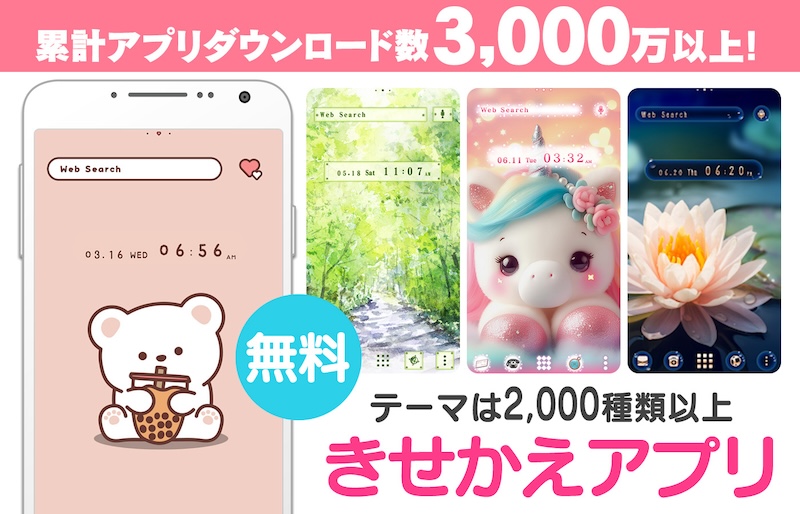
Let's download the app '+HOME' needed for America-style customization!
With the popular smartphone home customization app '+HOME', you can easily change your smartphone to a cute America-themed home screen for free! Set up wallpapers, icons, clock widgets, and search widgets effortlessly!
Popular America Theme Rankings: 16 Selection


+HOME Recommended Popularity Ranking
+HOME Special Features List.
-
🐱 Special Clip art of cat 🐱
Let's dress up your smartphone with cute cat illustrations! Find your favorite cat!
-
💜 Special Feature: Scenes with Wisteria Trellises and Flowers 💜
Get the most dramatic home screen, adorned with elegant Japanese charm and beautiful colors, featuring a theme of enchanting wisteria trellises and regal flowers 💜
-
☕ Stylish Korean-Style Theme Special ☕
Experience Korea's charm on your smartphone! Packed with stylish themes like simple and minimalist designs 🩷
-
🌃 Eye-friendly dark mode feature 🌌
A collection of practical dark mode themes with a black background for the entire screen that are easy on the eyes and conserve battery power 👀✨
-
📱 Home Screen Refugees: Find Your Next Theme 📱
Are you worried that your smartphone life is on hold because ""the app you’ve loved for years is shutting down...""?We, 「+HOME」, are here to fully inherit the joy of instant, complete home screen makeovers.
-
☔ Special Theme for Enjoying the Rainy Season ☔
Overcome the dreary rainy season! Spend the rainy season in comfort with smartphone kisekae themes that color the pattern ☔💖
-
🪐 Galaxy Special 🪐
Featuring smartphone standbys that feel the mystery of the universe! Galaxy motif designs of the night sky and space will add a fantastic touch to your everyday life!
-
🌼 Stylish Pattern Theme Special Feature 🎀
Get the latest trends to brighten up your smartphone! Get a sophisticated, cute-yet-mature home screen right now with checkered patterns, stylish floral designs, and other custom themes! 🌼
-
🌆 Nostalgic Theme Special Feature 🌆
Smartphone scenes bathed in twilight. Get your hands on fantastical displays woven with nostalgic light and shadow through sunset and night sky themes right now🌆
-
🌷 Cute Tulip Special 🌷
Make your phone into your own special item with this tulip motif theme full of cuteness!
-
🦜 Cute Birds Special 🦜
Feature on bird motifs to decorate your smartphone standby screen in a cute way! Adorable designs will soothe your heart.
-
🍎Feng Shui Motif Theme Special Feature 💖
Bring good luck with the Mahou screen! Boost your fortune with an apple and heart cat motif theme!?💰
-
🍣 Sushi and Japanese Sweets Theme Feature 🍵
Add delicious magic to your smartphone screen! With this Japanese gourmet design theme, enjoy a thrilling visual experience that makes your stomach rumble every time you look at it🍣😋
-
☺️ full of energy! Colorful Pop Theme Feature ❣️
Blow away the May blues! Introducing Kisekae with vitamin colors and fun motifs that will blow away your gloomy mood♪
-
🎵 Music Theme Special 🎵
Enjoy the world of music on your smartphone! Decorate your screen with rhythm using cassette tape and headphone themes🎵
-
️◼️ Dark Color Theme Special Feature️ ◼️
Supreme beauty blooming in the darkness. Indulge now in a sophisticated display where the profound cosmos and flowers perform together, featuring eye-soothing dark-colored roses and a galaxy-themed customization🌌
-
⭐ Star Special ⭐
Dreams and hopes connected by stars! Star motif designs perfect for mobile phone standbys ☆
-
🎄 Christmas Tree Special 🎁
Enjoy Christmas trees on your mobile phone♪ Get into the Christmas spirit by changing the design of your stylish tree!
-
⚙️ Nostalgic Deco Themes 🔑
Turn your phone into a vintage antique space! Featuring old keys, stamps, and gears, own this unique aesthetic. Customize your home screen now!
List of How to Use +HOME
-
About the Home Screen
-
Let's Change the Theme
-
How to Use the Drawer (App List)
-
Mastering the Home Screen
-
About the Iconpacks
-
How to Change Home Screen Icons Individually
-
How to Change Home Screen Icons All at Once
-
How to Change Home Screen Icons with Your Favorite Images
-
How to change home screen icon size